Omnicell

Reducing Task Time by 20% in a Legacy Pharmacy Management System

Omnicell’s 30-year-old enterprise system was critical to pharmacy operations but hindered by outdated workflows and dense, unintuitive interfaces. I collaborated with cross-functional teams to simplify complex data views, modernize the UI, and introduce consistent interaction patterns that matched healthcare professionals’ needs. The redesign reduced task time by 20%, minimized training overhead, and improved accuracy across key workflows.

Enterprise SaaS
UX/UI
Prototyping
Research
Usability Testing
Role
Timeframe
Tools
Team
Lead UX Designer
2022-2024
(1.5 Years)
Figma
Material 3
3 Eng Teams
3 PMs
Design System Team

Background

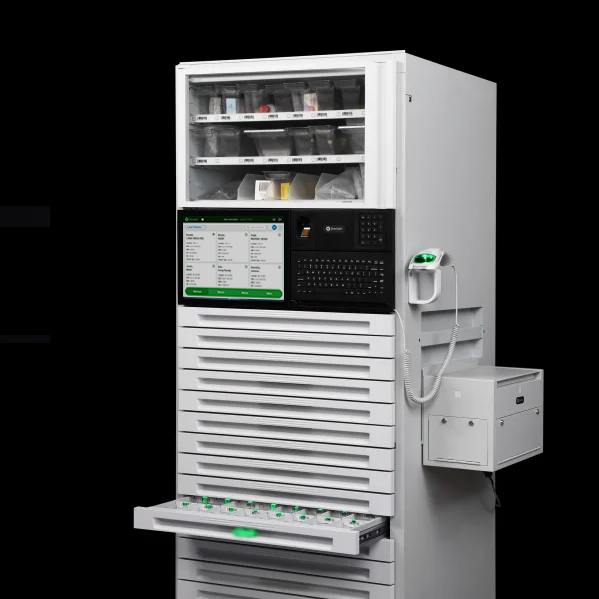
Omnicell is a leading healthcare technology company dedicated to transforming medication management through automation, intelligence, and data-driven insights. Its mission is to improve patient safety, streamline pharmacy workflows, and empower healthcare professionals to deliver better care. One of Omnicell’s core solutions is the XT Automated Dispensing Cabinet (ADC)—a secure, intelligent medication storage system used in hospitals and healthcare facilities to manage and dispense medications efficiently. The XT Cabinet supports nurses, pharmacists, and clinicians by reducing medication errors, increasing accountability, and saving valuable time during patient care.

When I joined Omnicell, my task was to improve the user experience of the XT Cabinet interface and its supporting ecosystem for the next generation of the software. This involved understanding the challenges clinicians face during medication retrieval and administration, and designing solutions that enhance usability, efficiency, and confidence at the point of care.

The Challenge

Nurses have relied on Omnicell’s dispensing software for over 30 years. While the legacy system was familiar, it was also clunky and inefficient.

Our challenge was to modernize both the experience and the UI, addressing long-standing pain points while preserving the familiarity users trusted.

How might we streamline the medication dispensing experience without sacrificing the sense of familiarity that nurses have so that new and existing customers can seamlessly upgrade without disrupting daily hospital operations?

The Process

When I joined Omnicell, the product organization was still in its early stages of maturity. The design team was structured into four groups, each focused on a specific user persona and product area. With a collective background in modern tech, our cross-functional team—design, product, engineering, and clinical—worked closely to establish shared frameworks, SOPs, and design standards that brought an antiquated healthcare product up to today’s industry expectations. Because we were modernizing an existing system, our approach leaned toward a Waterfall process, while we gradually integrated Agile principles to increase collaboration and speed.

Understanding the Problem Space

Entering such a complex domain required time and curiosity to truly understand the workflows and challenges nurses face. During onboarding, I began with workflow analyses to immerse myself in both the product and its users. To deepen my understanding, I supplemented research by watching customer training videos, reading discussions on the r/nursing subreddit, and shadowing a training SME at Mercy Scripps Hospital in San Diego. Observing nurses transition from Pyxis to Omnicell firsthand revealed critical insights into their learning curve and highlighted opportunities to improve the overall experience.

Mapping Out the Workflow

Once I had a solid understanding of the problem space, I mapped out the end-to-end medication dispensing workflow to see exactly how users, software, and hardware interacted. I combined screenshots of the legacy system, our Figma designs, and the current production setup into a single diagram. On top of that, I added sticky notes capturing insights, open questions, and tasks to tackle. This visual map made it easier for the team to spot pain points, identify opportunities for improvement, and align on where to focus our design efforts—ensuring that any changes would make the experience more efficient without losing the familiarity nurses depended on.

Key Findings From Research and Discovery

Through observing nurses in real workflows, analyzing product usage data, and reviewing the current software and hardware interaction, several key patterns emerged. These insights helped clarify the underlying challenges that shaped our “How Might We” question — how might we streamline medication dispensing to reduce cognitive load and help nurses focus on patient care?

Screens lack a clear visual hierarchy, forcing nurses to hunt for information
Nurses spend valuable time scanning dense interfaces with little distinction between critical and secondary information. Because every screen looks similar, it’s difficult to identify what matters most at each step. This revealed that the current UI isn’t guiding the user , the user is compensating for the UI.
Unhelpful UI causes nurses to rely on hardware cues and muscle memory
While observing nurses, I noticed they rely more on muscle memory and hardware cues (like flashing lights) than on the interface. This shows that the workflow has adapted around the UI’s shortcomings, indicating a disconnect between digital and physical touchpoints.
Low adoption of AnywhereRN remote software
When looking at customer data, I noticed that 72% of our customers have purchased the optional software that allows for nurses to queue up their meds remotely. Of the 72%, less than 40% of hospitals have adopted the software. This highlights a gap in integration, accessibility, or perceived value — suggesting that even when tools exist to streamline work, they aren’t being effectively incorporated into the core workflow.
Cumbersome patient management
When nurses come to the cabinet to get meds, they can find their patient in two places — the Global Patient List or the Local Patient List. Finding patients in long, unscrollable lists adds cognitive load and disrupts the medication flow. Nurses must cross-reference multiple sources or manually spell out names, introducing error potential and frustration.

Goals Based on Findings

Together, these findings reveal that the core challenge isn’t just speed — it’s cognitive effort. Nurses have adapted to inefficient systems by memorizing workflows and relying on hardware signals. The design challenge, therefore, is to create a more intuitive, guided experience that supports the way nurses naturally work, reduces friction, and builds confidence in both the interface and the process.

Reduce Cognitive Load
Design the interface to guide nurses.
  • Simplify information hierarchy so key details stand out at each step.
  • Use visual cues and progressive disclosure to help users focus on what matters now.
  • Support fast, confident decision-making without requiring memorization or extra scanning.
Improve Adoption and Trust in the System
Encourage nurses to rely on the software.
  • Integrate remote tools (like AnywhereRN) into the core experience.
  • Build consistency across touchpoints so users feel confident in what the system will do next.
  • Make success measurable through reduced time per task and fewer errors.
Increase Efficiency and Task Flow Clarity
Streamline the steps required to dispense medication or find patients.
  • Reduce redundancy, navigation steps, and switching between lists or screens.
  • Enable nurses to complete tasks with fewer clicks and clearer pathways.
  • Support flexible workflows that adapt to both remote and in-person scenarios.

Ideation and Exploration

We had to redesign dozens of workflows for the next generation of the software. The dispensing workflow was the most impactful because it’s the core action nurses perform every day and also the most complex. Reworking this flow allowed us to define new interface patterns, component structures, and visual hierarchies that we would later reuse across the entire system.

While nearly every screen required updates, the Patient List and Medication Removal screens became our primary focus. Both represented critical points in the nurse’s workflow where cognitive load, clarity, and efficiency mattered most. The following examples highlight how we identified pain points and reimagined the experience to better align with our design goals.

Patient List

The old patient list made nurses scroll through dense, unorganized data with no clear way to find who they needed. In the redesign, we introduced a personalized “My Patients” list, clearer hierarchy, and visual cues that surface who needs attention — helping nurses move faster and think less.

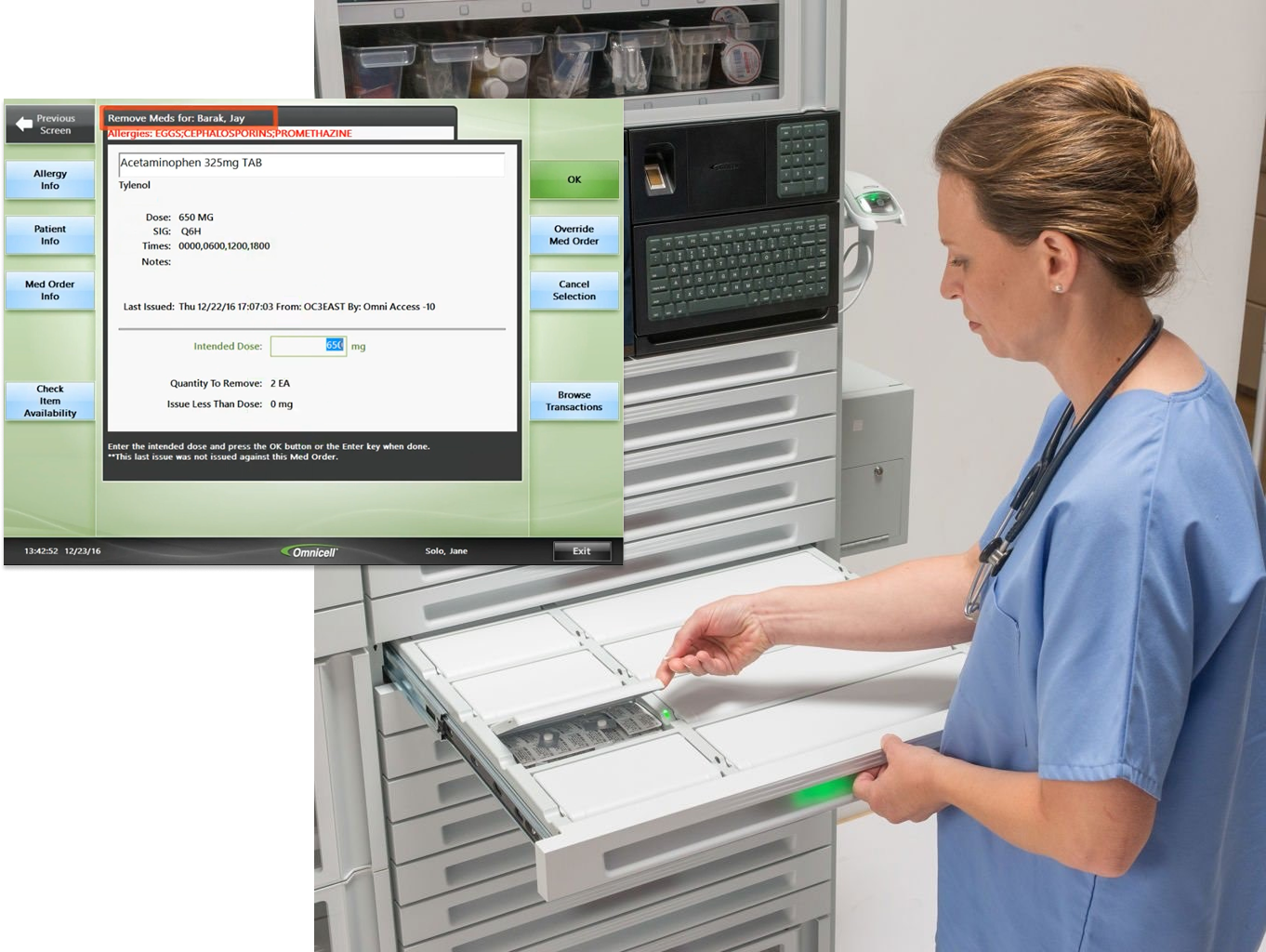
Color Touch (Old Workflow)

  • Global vs. Local lists: Nurses had to toggle between two similar lists each time they visited the cabinet, creating confusion and extra steps. This could be extra annoying for nurses who work multiple areas around the hospitals such as floaters, break nurses, or temporary nurses.
  • Dense, uniform layout: Critical details like room number or patient type didn’t stand out, forcing users to scan line by line.
  • Limited navigation controls: The list relied on manual scrolling, with no sorting or filtering options to speed up search.

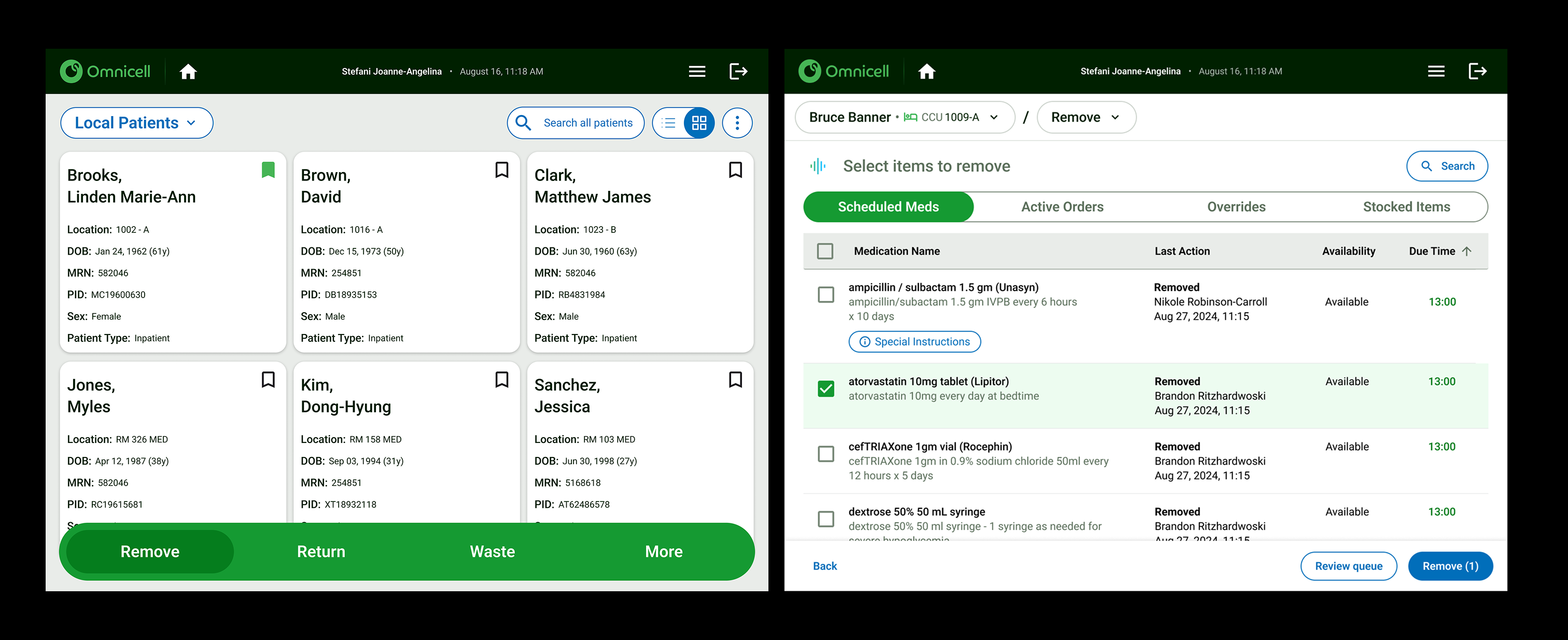
First Iteration

  • Introduced “My Patients” list integration: We brought the My Patients feature from AnywhereRN into the cabinet experience, allowing nurses to favorite or add patients from the local list to their own personalized list. They can do this from either the desktop app or directly at the cabinet, bridging the gap between remote and on-site workflows.
  • Improved readability and hierarchy: We standardized text size, spacing, and alignment to make key identifiers like patient name and bed number easier to scan. The overall density was reduced to help nurses visually parse information faster and with less cognitive effort.
  • Integrated task indicators: Icons for due medications, queued items, or unresolved issues were surfaced directly within the list. This gave nurses immediate visibility into which patients required attention, aligning with their workflow priorities.
  • Quick-access shortcuts: A new shortcuts panel at the bottom offered fast entry points to common actions. This minimized navigation time and allowed nurses to stay in flow without moving between screens.

Med List

After identifying issues in the patient list, we examined the next step in the workflow — removing medications. The existing med list lacked clarity and feedback, forcing nurses to rely heavily on memory and hardware cues to complete tasks. Information was scattered, actions weren’t intuitive, and there was little visual guidance for what to do next.

Color Touch (Old Workflow)

1. Unclear entry point: The “Remove Meds” action was buried within multiple menu options, requiring users to pause and recall the correct sequence before proceeding. This slowed down a critical, repetitive task.

2. Visually dense medication list: Once inside, the list presented medications in a uniform style with minimal hierarchy or prioritization. Important details like dosage or schedule didn’t stand out, increasing the chance of errors or hesitation. Furthermore, nurses would need to read the instructions to understand what needed to be done on this page.

3. Integrated task indicators: Icons for due medications, queued items, or unresolved issues were surfaced directly within the list. This gave nurses immediate visibility into which patients required attention, aligning with their workflow priorities.

4. Unintuitive tab organization: The medication categories were divided into multiple tabs (“Stocked Meds,” “Active Med Orders,” “Inactive Med Orders,” “PRN Only”), but the order didn’t match how nurses typically see or manage meds in the EMAR. This forced users to remember where to look instead of being guided by a logical, familiar flow.

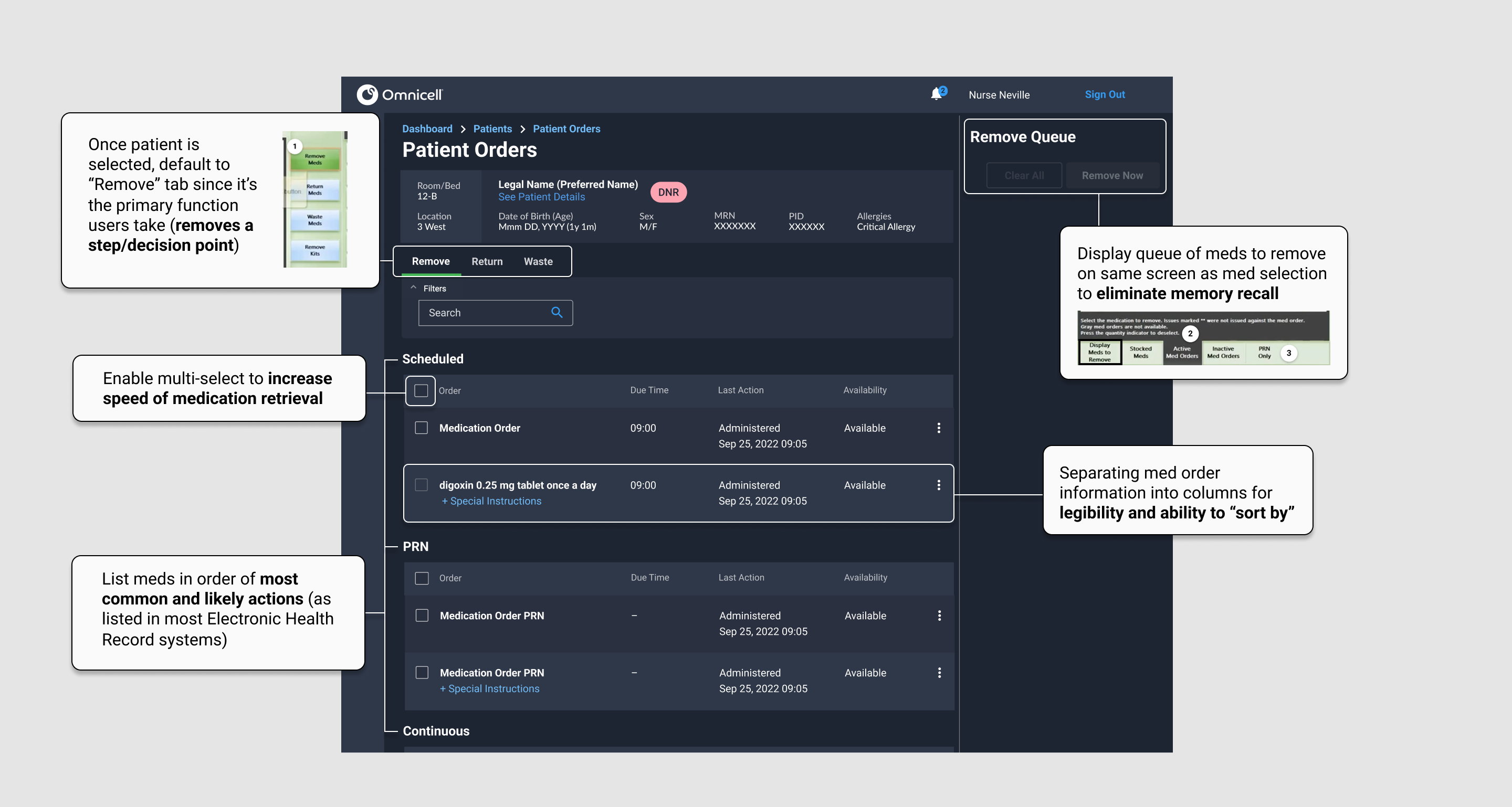
Explorations of First Iteration

Usability Testing in the Lab

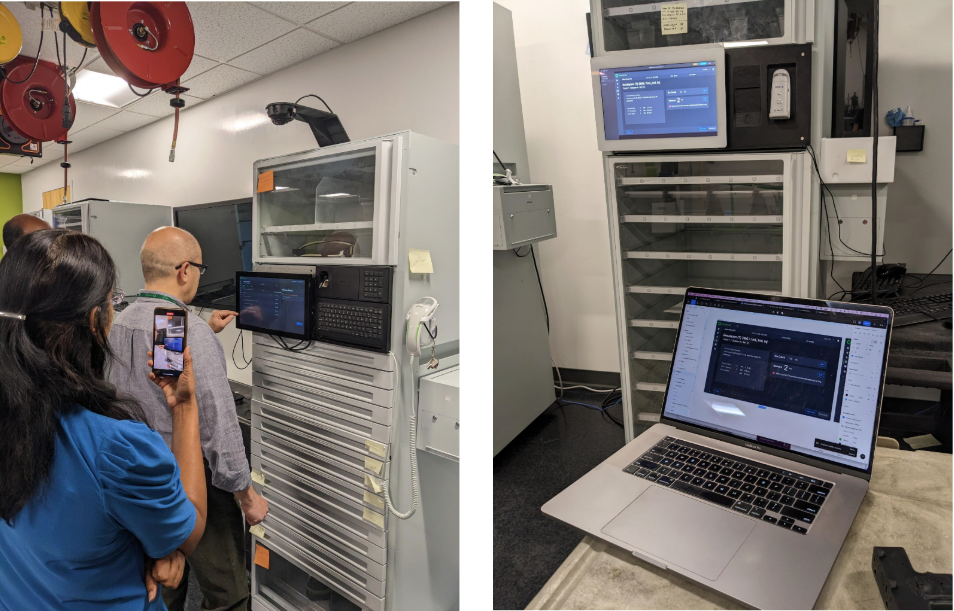
Once the dev teams got a workable demo of the dispense workflow onto a cabinet, we had two nurses from Bon Secours Health System (as well as a few internal teammates) to participate in guided Usability Testing. We gave them mock scenarios with tasks to complete. Our results were astonishing. The components we used to build our desktop experience did not translate well onto our touch device at the cabinet. Users had a hard time reading text on the screen, touching buttons, and scrolling through dropdown menus.


It was because of this testing that we decided we needed to create a "touch friendly" design system separate from the desktop experience.
Designing for Touch in Portrait Mode

Using what we learned from our customer research session, we pivoted to creating our "touch friendly" design system. At the time, we were also told by our Head of Product that we would be switching our next generation hardware to a portrait orientation and needed to account for that. We scaled all of our text and components 1.5x - 2x, arranged our layouts, and built new components for the ones that missed the mark in our first iterations. We were able to have different customers on site to test out these Figma prototypes and had much more success in task completion rate.

The Turning Point

Midway through the project, a company-wide re-org shifted priorities and brought in an external design agency. While much of our original work was paused, the research and design foundations we’d established became key references for the new direction. Rather than starting from zero, I focused on bridging what we’d learned from the first year with the agency’s new concepts. I helped ensure their designs reflected our core insights about cognitive load, safety, and efficiency in the medication workflow.

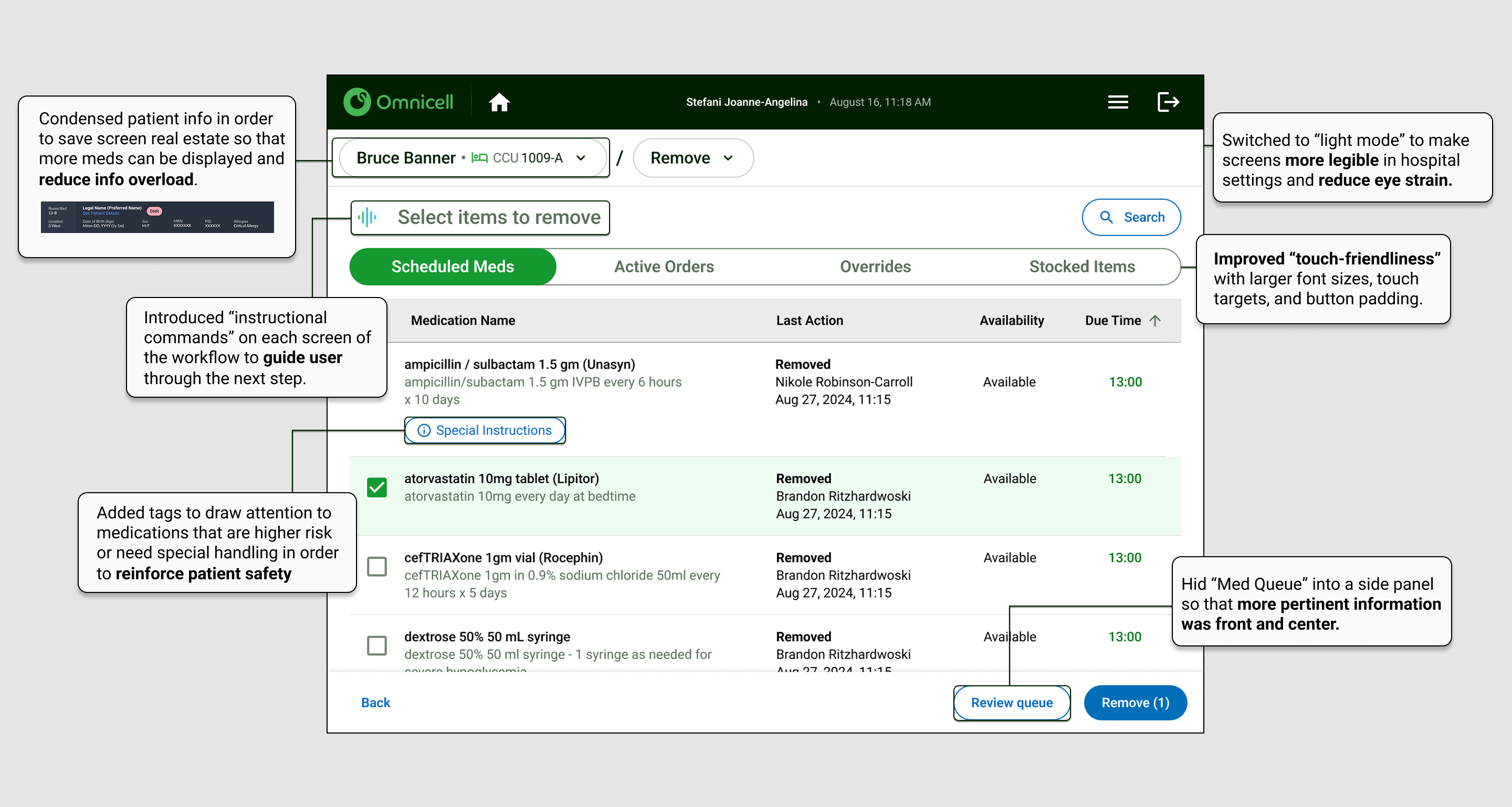
Final Design

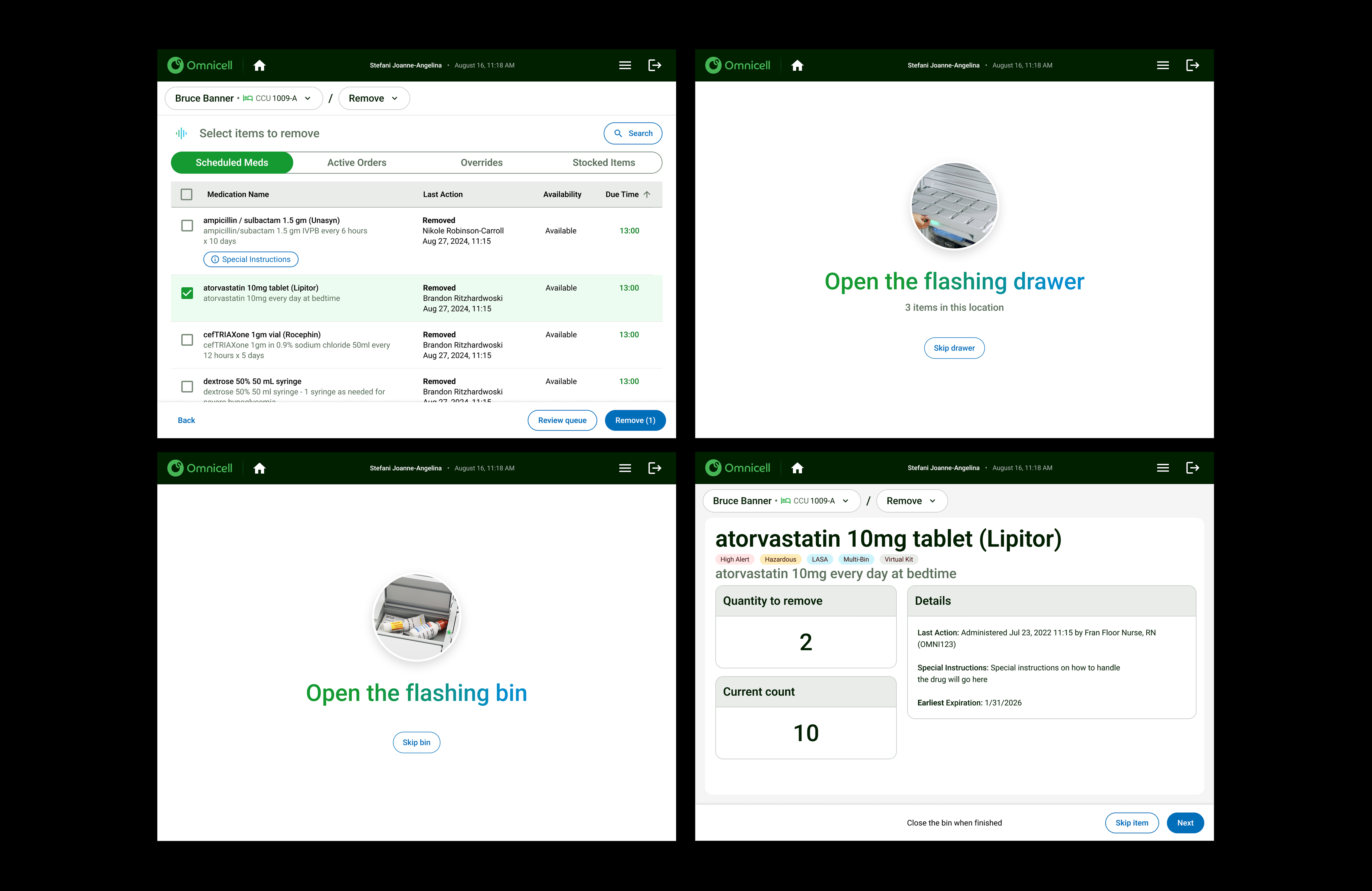
The final designs combined the agency’s refined visuals with our deep understanding of the user journey. What emerged was a more cohesive, cloud-ready experience that reduced friction and supported faster, safer medication dispensing.

Results

-20%
Reduced time on task by 20%
-45%
Reduced average clicks in workflow from ~15 to ~7

Final Thoughts

This project reminded me that large-scale design work is never a straight line.  Rather than seeing the re-org as as a setback, I focused on carrying forward what we had already learned — our field research, workflow analyses, and user insights — to guide the next phase of design and partnering with the agency.

As we began implementing the new experience, we started building and testing directly on the cabinets to validate interaction patterns in real environments. By the time I transitioned out of Omnicell, the team was preparing beta sites in partner hospitals to test the updated workflows with real users — a huge step toward closing the loop between research, design, and real-world impact.

Looking back, what stands out most isn’t just the final product, but the persistence of the process. It reinforced for me that good design is as much about adapting through change as it is about creating something new — and that progress often means stewarding the right insights forward, even as teams and structures evolve.

Back to Portfolio
Arrow ImageArrow Image